

Booking Software for Offline & In-Person Sessions
Take bookings for in-person sessions at your studio, clinic or centre. Klippme sends the venue address and map link with every confirmation, and collects payment first.
- Free plan
- No credit card
- 0% commission
- UPI payments
7-day free trial of every feature. Set up in about 5 minutes. Questions? Chat on WhatsApp
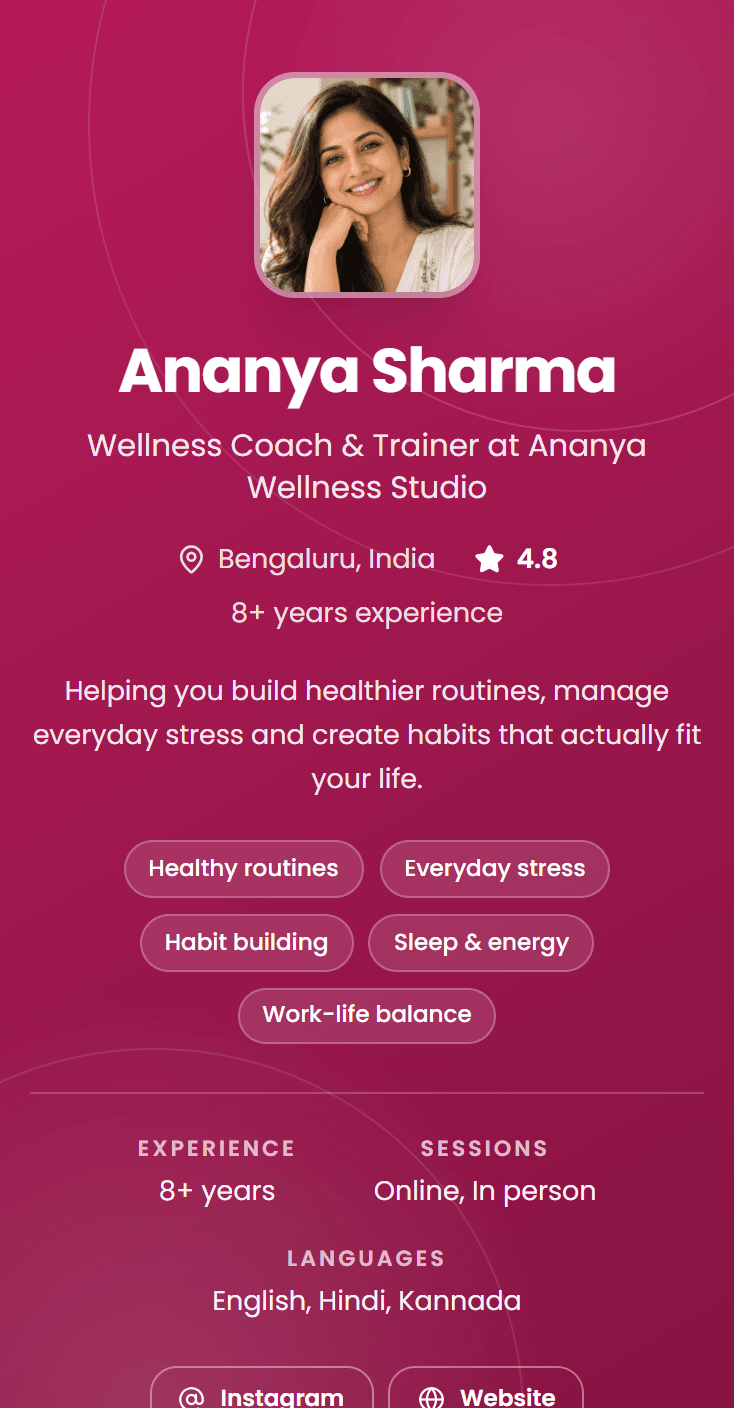
A real page, not a mockup
Most booking tools quietly assume the session happens on a video call. If your work happens in a room (a studio, a clinic, a centre, someone's living room), that assumption shows up as awkward workarounds: the address pasted into a message, directions explained again, and a client who arrives at the wrong gate.
Klippme treats in-person as a first-class case. Mark a session as in-person and every confirmation and reminder carries your venue name, address, map link and any arrival notes you write. Payment is collected at booking, capacity is enforced for group sessions, and you get a day view of who is coming and when.
Sound familiar?
What goes wrong with offline bookings
Directions explained one by one
The same landmark, the same parking note, typed out for every single client.
People who arrive without booking
Walk-ins are welcome until two of them arrive during a slot you had already promised to someone.
No-shows that cost a room
An empty slot in a hall you are paying rent on is a loss you feel twice.
Cash and UPI collected at the door
Payments taken in the doorway are the ones that get forgotten in the accounts.
How it works
From enquiry to paid booking, without you in the middle
- 01
Add your venue once
Name, full address, map link and arrival notes: the gate to use, which floor, where to park.
- 02
Clients book a real slot
They see your genuine availability, book, and pay before they travel.
- 03
They arrive knowing where to go
The confirmation and the reminder both carry the address and directions.
From Instagram to booked
From a comment to a confirmed booking, on its own
Someone comments on your reel at night. By the time you wake up, they have booked, paid and been reminded.
 1
1They comment BOOK
Someone asks on your reel, at any hour.
 2
2Auto-DM sends your link
Within seconds, from your own account.
 3
3They book and pay
Pick a slot, then pay by UPI, card or net banking.
 4
4Confirmed and reminded
On WhatsApp, with the time and venue.
Instagram and Facebook Auto-DM and WhatsApp reminders are included in Growth.
What you get
What you get for in-person bookings
Venue on every confirmation
Name, address, map link and your arrival notes, sent automatically.
Capacity for in-room classes
Set how many the room holds and let bookings stop at the limit.
Payment before arrival
Prepaid slots mean no cash handling and far fewer no-shows.
Buffers for turnaround
Gaps between clients so the room can clear and reset.
Reminders that reduce no-shows
A nudge the day before, which matters more when travel is involved.
Mixed online and offline
Run both from one page. Each session type carries its own mode.
Your booking page could be live before your next session.
Add your sessions, set your price, share one link. Clients book and pay without messaging you first.
Providers on Klippme
Real pages, taking real bookings
Open any of these and book a slot the way your clients would.
New moms comment on my reels at all hours, and I used to reply to each one by hand. Now Auto-DM sends them my booking link the moment they ask. It saves me hours every week, and I wake up to paid consultations instead of a pile of DMs.

Parents used to message me for dates and fees, and I kept losing track. Now I share one Klippme link. They pick a slot, pay, and get a reminder before the session. My workshop fills up without me chasing anyone.

I post a reel, people comment, and Klippme sends them the link to book. The payment comes in before the consultation and the Meet link goes out on its own. All I do is show up for the reading.

People want a quick call before they invest. My Klippme page lets them book a review in a couple of taps, and the Meet link reaches them automatically. It looks professional, and I’m not spending my day scheduling.

Pricing
Start free. Upgrade when you are busy.
Every new account gets 7 days of Growth free, with no credit card. 0% commission on every plan.
Free
₹0forever
- 1 one-on-one session, 10 bookings a month
- 1 group session, up to 10 seats
- Shareable booking link
- Email notifications & reminders
- Google Meet / Zoom links
- Manual & online payments (Razorpay)
- Cancellation & availability
Growth
₹499/month + GST
- Everything in Free
- Unlimited 1:1 + group sessions
- Unlimited bookings
- Coupon codes & flat discounts
- Session bundles & packages
- Email & WhatsApp reminders
Need your own domain or video courses? Compare all plans
Klippme at a glance
Klippme is a booking and payments page for people who run sessions, classes and workshops in India, online or in person, with Instagram and Facebook Auto-DM built in.
- Who it is for
- Coaches, consultants, therapists, yoga and fitness teachers, tutors, clinics, studios, workshop and experience hosts, tour and activity operators and creators in India, solo or as a team.
- Price
- Free plan available. Growth ₹499/month (₹4,990/year), Pro ₹999/month (₹9,990/year), plus 18% GST.
- Free trial
- 7 days of full access, no credit card.
- Commission
- 0% on every plan. Klippme takes no cut of session fees; only Razorpay’s standard gateway fee applies.
- Payments
- UPI, cards, net banking and wallets via Razorpay, paid into the provider’s own bank account. A manual mode lets clients pay any way and the provider confirms.
- What you can sell
- 1:1 sessions, group batches with seat limits, workshops and multi-day intensives, courses, session packages, in-person sessions with a venue and map link, recordings, video courses and documents.
- Reminders and meetings
- Email on every plan, WhatsApp on Growth and Pro. Google Meet and Zoom links generated for every online booking.
- Instagram Auto-DM
- Replies to comments, DMs and story replies with the booking link or a free guide, through Meta’s official Instagram API. Included on Growth and Pro.
- Teams
- Enterprise adds professionals under one brand at ₹399 per professional per month, on top of any paid plan.
- For clients
- No app and no account. They open the link, pick a slot and pay.
Questions
Questions about offline bookings
How do clients know where to come?
You add your venue name, address, map link and arrival notes once. Every confirmation email and reminder for an in-person session carries all of it automatically.
Can I run online and in-person sessions from the same page?
Yes. Mode is set per session type, so an online consultation and a studio class can sit side by side on one booking page.
Can I limit how many people attend in the room?
Yes. Set a seat limit on the session and bookings close themselves once the room is full.
Does it work for home visits?
Yes. Take the booking and payment in advance, and use the booking form to collect the client’s address and any access instructions.
Can I still take payment in person?
Yes, manual mode allows it. Most people collecting at the door switch to prepayment fairly quickly, because it is what removes no-shows.
Also built for
Experience Booking Software
Sell places on the experiences you host: walks, tastings, studio sessions, day activities. Klippme handles dates, group caps, prepayment and the photos that sell it, with no marketplace commission.
In-Person Workshop Registration
Run a workshop in a hired room without guessing the numbers. Seats prepaid by UPI with 0% commission, live registrations, a break-even you can watch, and the venue on every confirmation.
Yoga Class Booking Software
Morning and evening batches with live seat counts, courses sold once, fees up front. Razorpay and UPI, flat monthly price, no cut of your class fees.
Get started
Stop managing bookings. Start running your business.
Create your booking page in minutes and share it wherever your clients already find you.
Free plan. No credit card. 0% commission
Free plan. No credit card. 0% commission